Summary:
Perplexity AI citations are influenced by how clearly your content is structured, marked up, and presented to AI systems. To improve your chances of being cited, use structured schema markup (such as TechArticle, FAQPage, and DefinedTerm), organize content with clear headings, answer questions directly, and present technical information in tables or code blocks where appropriate.
While schema markup alone does not guarantee citations, combining structured data with well-organized content makes it easier for Perplexity AI to discover, interpret, and reference your documentation.
When a developer asks Perplexity AI “How do I authenticate with the Stripe API using OAuth2?”, Perplexity searches the web, finds relevant documentation, and displays an answer with a clickable citation link pointing to the source.
If your API documentation is structured clearly with the right metadata, Perplexity can extract, understand, and cite your docs more effectively. If it’s just walls of text, Perplexity either ignores it or cites generic alternatives. This guide covers the specific techniques to make your API docs citation-friendly.
How Perplexity Finds and Cites Your Documentation
Perplexity uses a system called Retrieval-Augmented Generation (RAG). In plain English: Perplexity’s web crawler (called PerplexityBot, similar to Googlebot) reads your pages, extracts relevant information, ranks which sources are most useful, and feeds those sources into its AI model. The model generates an answer and attributes it back to the most relevant sources with citation badges.
Unlike traditional search engines that rank pages by domain authority and backlinks, Perplexity prioritizes sources that:
Directly answer the user’s question (not tangential or partially relevant content)
Contain structured, machine-readable data (schema markup, clear headings, tables, code blocks)
Have clear, isolatable facts (a sentence the AI can extract and quote, not buried in prose)
What is Schema Markup? (The Nutrition Label Analogy)
A cereal box has two labels. The front is colorful marketing. The back has the Nutrition Facts Label—a standardized format listing ingredients, calories, and nutrients.
Schema markup is the digital equivalent of that nutrition label. It’s hidden code that sits in your HTML and tells AI systems: “This section defines an API endpoint. That section lists error codes. This table documents parameters.”
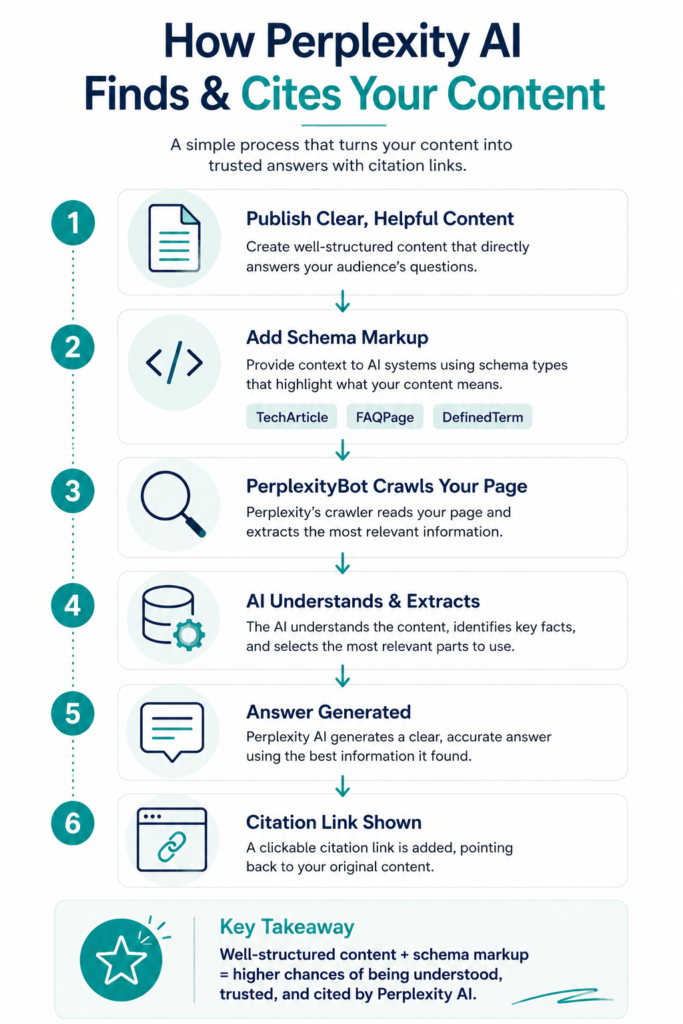
Humans visiting your site see nothing different. But Perplexity’s crawler can instantly identify what information you’re presenting and extract it with confidence.
The Core Schema Types for API Documentation
You don’t need dozens of schema types. For API documentation, focus on three:
1. TechArticle Schema
Use this for guides, tutorials, and endpoint documentation. It tells Perplexity: “This is a technical article with step-by-step instructions or authoritative information.”
“`json{ “@context”: “https://schema.org”, “@type”: “TechArticle”, “headline”: “OAuth2 Authentication for Stripe API”, “description”: “Step-by-step guide to implementing OAuth2 bearer token authentication.”, “dependencies”: “Stripe API v1.0+”, “proficienciesRequired”: “Basic REST API understanding”, “dateModified”: “2026-06-04”}“`
2. FAQPage Schema
Use this when your documentation already includes Q&A sections (e.g., troubleshooting, common errors). This schema explicitly tells Perplexity where questions and answers live, increasing the chance Perplexity cites your answer when developers ask similar questions.
“`json{ “@context”: “https://schema.org”, “@type”: “FAQPage”, “mainEntity”: [ { “@type”: “Question”, “name”: “What does Error 401 mean in the Stripe API?”, “acceptedAnswer”: { “@type”: “Answer”, “text”: “Error 401 means your API key is missing or invalid. Check your dashboard and regenerate if needed.” } } ]}“`
3. DefinedTerm Schema
Use this for glossaries, parameter definitions, and error code lists. It marks up technical vocabulary so Perplexity can cite specific definitions when developers ask “What is a webhook?” or “What does rate limiting mean?”
“`json{ “@context”: “https://schema.org”, “@type”: “DefinedTerm”, “name”: “Rate Limiting”, “description”: “A technique that restricts the number of API requests a client can make within a time window. Stripe enforces a rate limit of 100 requests per second.”}“`
How to Implement Schema (3 Free Tools)
You don’t need to code JSON manually. These free tools generate schema for you:
Option 1: TechnicalSEO.com Schema Generator
- Select “TechArticle” or “FAQPage” from the dropdown
- Fill in your headline, description, and URL
- Copy the JSON-LD output and paste into your HTML <head> section or use your CMS’s schema plugin
Option 2: WordPress Plugin (Rank Math or Yoast SEO)
- Install Rank Math SEO or Yoast SEO plugin
- Open your post editor and scroll to the “Schema” or “Structured Data” section
- Click “Add Schema” and select “TechArticle” or “FAQPage”
- The plugin auto-injects the code when you save
Option 3: Google Rich Results Test
After adding schema, paste your URL into Google’s Rich Results Test. It shows if your schema is valid and how Google/Perplexity will see it.
Content Structure Best Practices
Schema markup works best when combined with clear content structure. Here are the practices that improve Perplexity citability:
BLUF Writing: Answer First, Details Second
BLUF stands for “Bottom Line Up Front.” The first sentence should directly answer the question. Example:
Bad: “Authentication is a critical aspect of API security that ensures only authorized users can access protected resources…”
Good: “To authenticate with the Stripe API, use a bearer token in your Authorization header. Include your API secret key in this header on every request.”
Perplexity’s crawler looks for the direct answer in your opening sentences. If it finds it, that section becomes citation-worthy. Many of these principles overlap with broader AI search optimization practices, particularly answer-first writing and content chunking techniques.
Content Chunking: Break APIs Into Logical Sections
Don’t document all 50 API endpoints on one massive page. Break your API into logical groups and give each its own page or section. Examples:
- One page for Authentication Endpoints
- One page for Payment Methods Endpoints
- One page for Webhook Events
Chunking lets Perplexity index each section independently. When a developer asks “How do webhooks work in this API?”, Perplexity finds your dedicated webhook page instead of scrolling through a 10,000-word monolith.
Question-Based Headings: Use H2/H3 Headers as Questions
Instead of creative or vague headings, use direct questions:
❌ “Auth Flow Overview”
✅ “How Do I Authenticate with an API Key?”
✅ “What Error Codes Does the Auth Endpoint Return?”
✅ “How Long Before My API Key Expires?”
Perplexity’s crawler matches these headings to common developer questions. When someone asks Perplexity “How do I authenticate with an API key?”, your heading is an exact match.
Data in Tables, Not Prose
When documenting parameters, error codes, or response fields, use tables with explicit column headers. Example:
| Parameter | Type | Required | Description | Example |
|---|---|---|---|---|
| api_key | String | Yes | Your unique API secret key | sk_test_abc… |
| timeout | Integer | No | Request timeout in milliseconds | 5000 |
Tables allow Perplexity to extract individual parameter data and cite it without paraphrasing. Prose descriptions are harder to extract precisely.
Advanced Tactics for Citation Optimization
Beyond schema markup, these additional techniques improve how Perplexity interacts with your API docs:
1. Add an llms.txt File
Create a simple text file at yoursite.com/llms.txt that tells AI systems (including Perplexity) about your API. Include:
# Stripe API DocumentationYour API is for payment processing.Key features: payments, authentication, webhooksMain docs: /docs/apiGlossary: /docs/glossaryError reference: /docs/errors
2. Entity Clarity: Use Consistent Naming
If your API has complex objects (Customer, Invoice, Subscription), refer to them by the same name everywhere. Don’t switch between “Customer,” “User,” and “Account.” Consistent naming helps Perplexity understand your entity relationships and cite the right docs when developers ask about specific object types.
3. Explicit Error Documentation
Document every error code with: the code, the cause, and the solution. Perplexity frequently cites error documentation when developers ask “What does Error 429 mean?” or “How do I fix Error 401?”
Error 401 – UnauthorizedCause: Your API key is missing, invalid, or expired.Solution: Verify your API key in the dashboard. If expired, regenerate a new one and update your code.
4. Use Code Block Language Tags
Always specify the language for code examples: “`javascript, “`python, “`bash, etc. Perplexity indexes code by language and cites language-specific examples when developers ask “How do I do this in Python?”
Testing and Validation
After implementing schema and restructuring your docs, validate your work:
- Run your API documentation URL through Google’s Rich Results Test (search.google.com/test/rich-results)
- Check that your TechArticle, FAQPage, or DefinedTerm schema appears in the results
- Test your documentation on Perplexity by searching for common developer questions related to your API
Note: Indexing timelines vary. There is no guaranteed timeline for when Perplexity will index your changes or adjust citations. Typically, structural improvements can improve discoverability within days, but this depends on Perplexity’s crawl schedule and the competition for citations in your topic area.
Summary
Getting cited by Perplexity isn’t about gaming an algorithm—it’s about making your API documentation easy for AI systems to understand and extract.
The same principle increasingly applies across Google AI Overviews and other AI-powered search experiences where content must be structured for extraction and citation. Schema markup (TechArticle, FAQPage, DefinedTerm), combined with clear structure (chunking, BLUF writing, tables, question-based headings), gives Perplexity the clarity it needs to cite your docs reliably. Start with TechArticle schema on your main documentation pages, add FAQPage schema to any Q&A sections, and validate with Google’s Rich Results Test. The investment is minimal, and the payoff is better visibility among developers using AI-powered search.
Next Steps
Choose one free tool (TechnicalSEO.com, Rank Math, or Yoast) and generate TechArticle schema for your main API overview page
Add FAQPage schema if you have a troubleshooting or common questions section
Test your pages in Google’s Rich Results Test to verify schema validity
Search Perplexity for common questions about your API and check if it cites your docs. Adjust structure if certain topics aren’t being cited.